Best Note-Taking Apps in 2026

Key takeaways
- Our top pick: Notion: Best all-in-one workspace.
- Obsidian: Best for privacy-first power users.
- Evernote: Best for capturing everything.
Quick comparison
| Product | Rating | Starting price | Best for | |
|---|---|---|---|---|
| NotionTop pick | ★★★★★ | From $10/seat/mo | Best all-in-one workspace | Visit Notion |
| Obsidian | ★★★★★ | Free; Sync from $4/mo | Best for privacy-first power users | Visit Obsidian |
| Evernote | ★★★★☆ | From $8.25/mo | Best for capturing everything | Visit Evernote |
Pricing checked Oct 22, 2026, always confirm current pricing and billing terms on the vendor's official site.
Your notes are the raw material of everything you make: ideas, research, meeting minutes, half-formed plans. The right app gets out of the way and makes retrieval effortless; the wrong one becomes a graveyard of good intentions. We compared the three note-taking apps with the most staying power in 2026, each representing a different philosophy of how notes should work.
How we evaluated
We weighed capture speed (how fast an idea goes from brain to app), organization (search, linking, databases), cross-device sync reliability, pricing fairness, and data ownership. We favor apps that export cleanly, because your notes should outlive any single vendor.
The shortlist
- Notion: the flexible all-in-one workspace for docs, wikis, and databases.
- Obsidian: the local-first powerhouse for linked thinking and privacy.
- Evernote: the veteran capture machine with the best web clipper in the business.
Detailed reviews
Notion: best all-in-one workspace
- Docs, wikis, and databases in one flexible workspace
- Generous free plan for individuals
- Huge template gallery and integrations
- Can slow down with very large workspaces
- Offline access is limited
- Per-seat pricing adds up for teams
Notion is less a notes app than a workspace that happens to take great notes. Pages can be simple documents, kanban boards, calendars, or full relational databases, and everything links together. For teams and solo users who want one place for docs, project tracking, and wikis, nothing else is this flexible at this price. The free plan is genuinely usable, and the template gallery means you rarely start from a blank page.
The trade-offs are performance and ownership. Very large workspaces can feel sluggish, offline access remains a weak point, and your data lives on Notion's servers. Per-seat pricing is fair for small teams but climbs quickly as you grow.
Testing notes: not hands-on tested for this roundup; assessed from official documentation and verified user reports.
Obsidian: best for privacy-first power users
- Local-first: your notes live on your device
- Powerful backlinks and graph view
- Thousands of community plugins
- Free with no feature limits
- Sync and Publish are paid add-ons
- Steeper learning curve than rivals
- No built-in real-time collaboration
Obsidian takes the opposite approach from Notion: your notes are plain Markdown files stored locally on your device. No account required, no cloud lock-in, and it works fully offline. On top of that foundation it layers the best linking system in the category, with backlinks and an interactive graph view that surfaces connections between ideas. The plugin ecosystem (thousands of community plugins) lets you shape it into almost anything.
The catch is that the good stuff beyond the core app costs extra: official Sync (end-to-end encrypted) starts at $4/month and Publish at $8/month. There is also a learning curve, and real-time collaboration is not a native strength. But for individuals who value privacy and longevity, the free core app is unmatched.
Testing notes: not hands-on tested for this roundup; assessed from official documentation and verified user reports.
Evernote: best for capturing everything
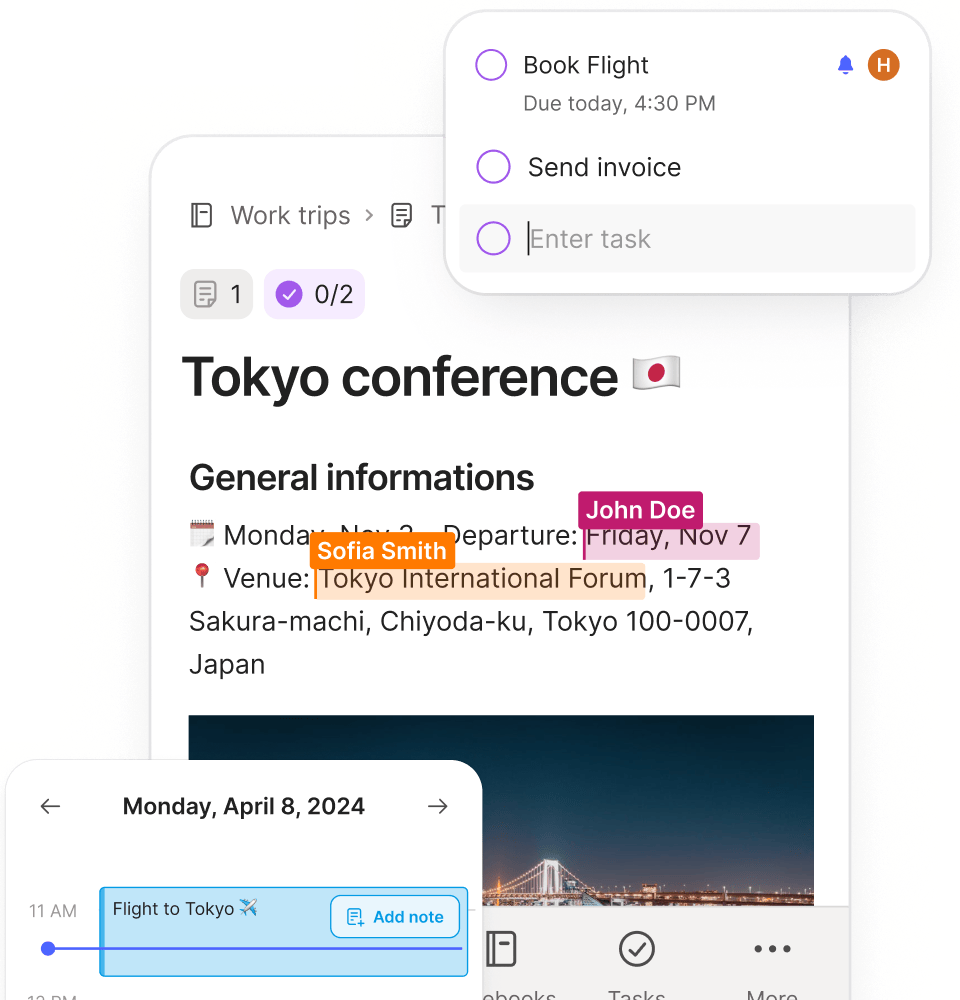
- Excellent web clipper and document scanning
- Strong search, including text inside images
- Tasks and calendar built into notes
- Free plan is very limited
- Pricier than most rivals
- Interface can feel dated
Evernote pioneered the "remember everything" idea and still does capture better than anyone. Its web clipper is the gold standard, document scanning is excellent, and search finds text inside images and PDFs. Recent versions added tasks, calendar integration, and AI features, making it a credible all-rounder rather than just a filing cabinet.
The downsides are price and the free tier. Evernote is the most expensive app here, and the free plan is too limited for serious use. The interface, while improved, still feels a step behind Notion and Obsidian in polish. But if your workflow starts with clipping, scanning, and searching, it earns its keep.
Testing notes: not hands-on tested for this roundup; assessed from official documentation and verified user reports.
Which should you pick?
- Want one workspace for notes, docs, and projects? Notion.
- Want private, local-first notes you own forever? Obsidian.
- Want the best capture and search for a messy digital life? Evernote.
All three offer free tiers or trials, so try your top two for a week with real notes before committing. The best note-taking app is the one you actually open every day.
FAQ
Is Notion really free?
Yes, for individuals. The free plan includes unlimited pages and blocks, with file upload limits. Paid plans (from $10/seat/month) add collaboration features, larger uploads, and advanced permissions.
Is Obsidian really free?
Yes. The core app is free with no feature limits and no account required. Only the optional Sync ($4+/month) and Publish ($8+/month) services cost money.
Can I migrate my notes between these apps?
Mostly yes. All three support Markdown import/export, so moving is feasible, though complex Notion databases need manual rebuilding elsewhere.
Which is best for teams?
Notion, by a clear margin. Its real-time collaboration, permissions, and shared workspaces are built for teams, while Obsidian and Evernote are primarily individual tools.
The bottom line
- Notion Top pick: Best all-in-one workspace.
Check price - Obsidian: Best for privacy-first power users.
Check price - Evernote: Best for capturing everything.
Check price